BIM Services
Everything You Need to Know about Clash Detection in The Construction Industry using BIM Clash Detection Services
-
 Soumen
 - February 24, 2025
- 12:16 pm


U.S.-based local architectural representation, ensuring communication, accountability, and delivery expectations, managed close to the client.
Explore more
Discover our architectural design excellence through a curated selection of projects.
Explore more
Take a look at how Uppteam can elevate your projects with expert engineering solutions.
Explore more
Our Structural Support Services can enhance your structural engineering projects with expert support.
Explore more
Uppteam delivers precise and reliable surveying and mapping solutions to help you make informed decisions.
Explore more
Whether you're working on residential, commercial, or industrial buildings..
Explore more
Uppteam’s Virtual Admin Support can help you with all your administrative tasks..
Explore more
Our experts work as your Second Eye Services expert.
Explore more Soumen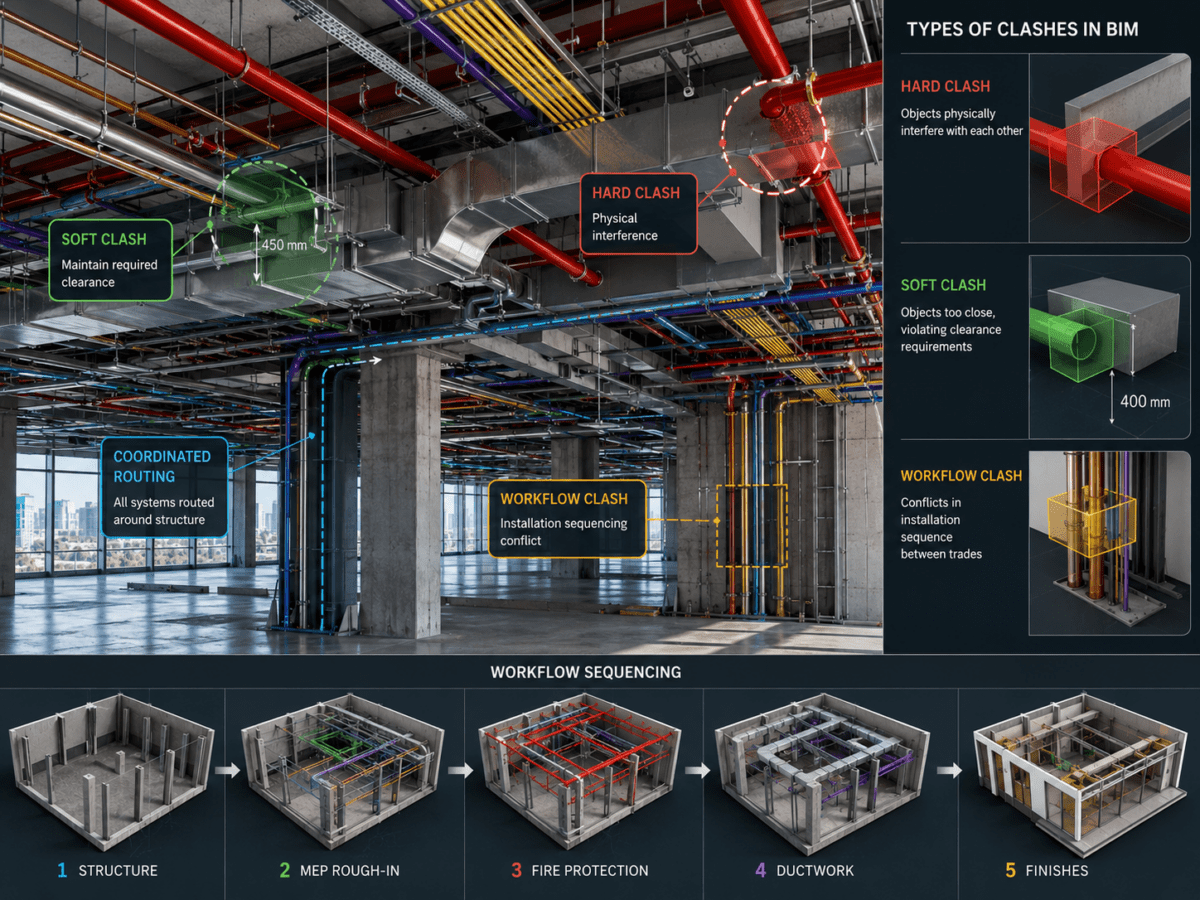
In a multidisciplinary construction project, design conflicts between structural, architectural, and MEP systems are not the exception; they are the default. When these conflicts reach the construction phase, unidentified, the outcome is site-level rework, change orders, schedule compression, and cost overruns that no contingency can fully absorb. BIM clash detection resolves this problem at the source, identifying hard, soft, and workflow clashes during the design phase.
This guide demonstrates the different types of BIM clashes, the central reasons behind design conflicts in building models, and how AEC teams can deploy clash detection workflows to furnish coordination-clean CD sets.
Design conflicts are an inherent risk in any multidisciplinary construction model. Architects focus on the visual elements, while MEP engineers prioritize safety, functionality, and efficiency. Their independent designs can clash when submitted together.
BIM clash detection locates and fixes these conflicts during design so that they never turn into field-level errors, delays, and rework. Project teams employ BIM technology to address potential problems early in the process before they escalate on-site.
The types of design conflicts commonly arising in BIM can be categorized into hard, soft, and workflow clashes, each requiring specific attention for effective resolution.
A soft clash occurs when design elements are positioned too closely, potentially violating required clearance spaces. These clearance violations may not involve immediate physical overlap, but they create practical challenges that affect construction and future maintenance. Clash detection support providers recognize subtle conflicts related to problems like inadequate installation space or challenges in accessing areas for regular maintenance.
Examples:
Proficient designers use BIM tools to recognize such soft clashes so that the related designers can fix the issues during the design phase and avoid costly modifications during construction.
Unlike soft clashes, hard clashes are material conflicts where design components collide. As a result, designers must redesign to eliminate hard clashes and avoid safety problems, structural errors, and project uncertainties in the long run.
Examples:
If contractors and designers can identify design clashes early, they can avoid costly on-site modifications, saving money and time.
Workflow clashes arise from sequencing conflicts among trades where the installation timeline of one discipline assumes conditions that another has not yet met. These are among the most often neglected clashes during the design stage and are among the most expensive to overcome on-site.
Examples:
BIM support services identify such clashes so contractors can work with relevant teams to adjust the designs and maintain the workflow. Recognizing these clashes is an essential step in any construction project, as they can cause unnecessary delays and additional costs. BIM tools allow designers to identify such clashes with ease.
BIM models integrate MEPF, architectural, and structural systems into a unified framework. Consequently, teams get a single coordinated environment where conflicts among disciplines become visible before construction starts.
BIM’s collaborative model administers a complete spatial view of the structure across every discipline simultaneously. It combines various construction disciplines, including MEPF, structural, and architectural systems, to work in sync and create a cohesive design.
In developing this integrated model, the goal for designers is to align all elements to enable smooth functionality throughout the project. However, clashes are inevitable despite the effort to create an error-free system. When different trade elements and processes are brought together, there is always the risk of conflicts—whether physical or functional—in the final design.
The planning phase typically involves defining precise locations and sequencing for each building component. Despite the best efforts to place everything in its designated spot, conflicts can still arise for several reasons, often due to misalignments or overlooked design details. These clashes can manifest as physical overlaps, design inconsistencies, or workflow misalignments and are best detected during the BIM clash detection process.
As construction teams work to create detailed models, MEP clash detection services employ BIM experts who utilize advanced software like Revit and Navisworks to identify and resolve conflicts before they turn into costly on-site issues. Here are some of the primary reasons why clashes occur in building models:
Depending on the project phase, BIM models can vary in the level of detail they present. If a model is created with an overly low or inconsistent level of detail (LOD), important elements may be omitted or inaccurately represented.
Design flaws are a common cause of clashes. These may arise from a failure to account for physical space, inadequate measurements, or errors in architectural or structural calculations.
Misinterpretations of design preferences or erroneous scaling can result in elements not aligning correctly in 3D space.
During the modeling process, miscommunication and poor coordination among teams can create operational gaps or inefficiencies. Workflow conflicts can happen when the operations and commitments between disciplines are unclear.
In some cases, discrepancies between the task model and annotations or markup notes result in conflicts. If data inputs such as material specifications and segment sizes are incorrect, the model may produce an inaccurate final design. This can lead to issues when teams rely on outdated information during construction.
Effective planning is crucial for a successful building model. Inadequate planning can leave design elements unresolved and disrupt project phases, leading to improper material placement and potential clashes. Quality problems, such as choosing the wrong materials or making manufacturing mistakes, can create additional conflicts and make the design process more difficult.
Building models often face conflicts, but teams can reduce risks by understanding their causes. Good teamwork, clear communication, and advanced tools like clash detection software can help fix problems early. This way, they can avoid costly delays or rework.
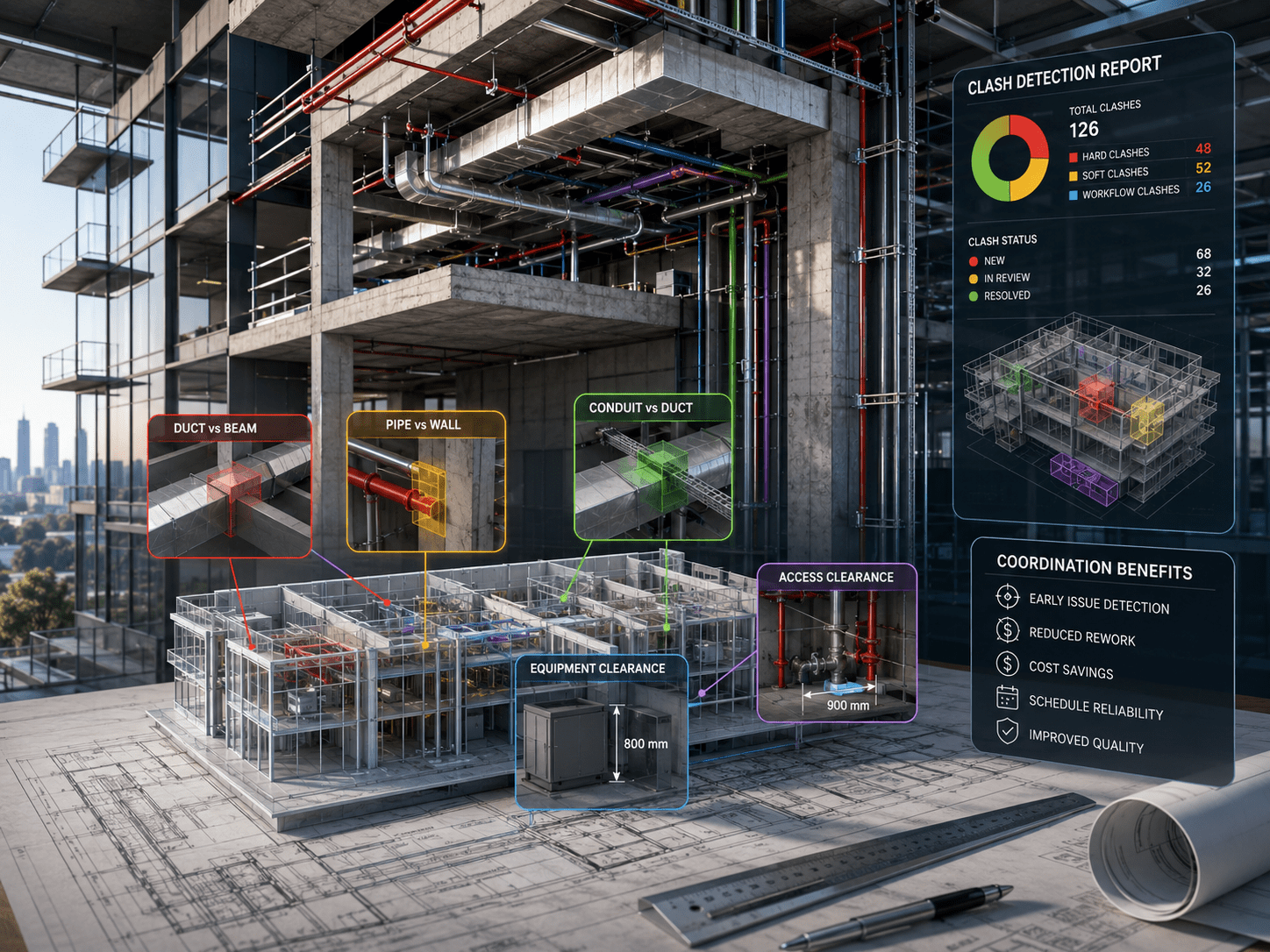
BIM tools have long been used to produce coordinated building models, and clash detection is now among their most critical procedural applications. In modern projects, BIM-centric conflict detection during the design stage is a customary practice for AEC teams managing multidisciplinary coordination risk. These tools are a cost-effective, practical solution to issues such as safety and compliance in building structures.
Complying with building standards and codes becomes increasingly crucial as building requirements become more complex. Technology and automation are essential for achieving better performance and reducing costs.
In the AEC industry, BIM simulation and engineering improve project execution by allowing stakeholders to collaborate effectively. BIM-based clash detection identifies conflicts among building parts and workflows to ensure they fit together properly.
Clash detection also helps produce accurate BOMs, BOQs, and GFC drawings, preventing rework and delays through clean visualizations and error-free construction mapping. It guarantees coordination accuracy and workflow efficacy that manual drawing processes can never replicate.
BIM allows designers to identify design conflicts before the start of site work. Once the clashes are determined using BIM support services, it becomes easier for the designers to resolve those issues quickly. As a result, AEC stakeholders get a conflict-free design set.
BIM clash detection also enhances the accuracy of the on-site project, as contractors have clarity regarding the type and quantity of materials they need. Thus, BIM tools detect conflicts that can significantly impact the project’s execution if unresolved. Hence, BIM helps align resources on the construction site.
BIM tools also share information about operational risks, not design conflicts, but safety factors. The 3D models they provide allow the field coordinators to take the necessary safety measures that align with the detected threats.
One significant benefit of BIM tools for clash detection is that they create a 3D representation of the future project. While this is most important during the pre-construction phase, it also helps the property manager supervise the building even after construction. So, the results of BIM software for clash detection are not limited to the pre-construction phase but also to the post-construction phase.
uppteam renders BIM clash detection services for infrastructure, industrial, and commercial projects. The full range of services covers comprehensive multidisciplinary coordination reviews across MEP, structural, architectural, and fire protection systems. Whether a project needs a complete clash audit across all disciplines or targeted verification of particular design components, our BIM team produces actionable conflict reports within specified turnaround windows.
You can send us your project files, and our team of BIM experts will quickly analyze them using advanced BIM clash detection software. We use Autodesk Revit, Graphisoft ArchiCAD, BIMCollab, BIM 360, and other advanced BIM software to check your designs for possible conflicts. Once the review is complete, we render a detailed report outlining all detected clashes, their discipline category, and their exact locations within the model. The locations are indexed in a marked-up file accompanied by a PDF for easy design team and contractor reference.
uppteam quickly identifies clashes even if your project involves a complex industrial building. Our experts work in multiple teams to enhance their capacity and ensure that all disciplines are checked within a specific timeframe.